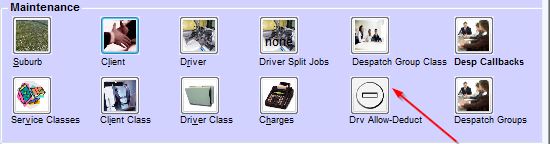
You can choose Allowances and Deductions option from Maintenance.
You can pay regular and occasional allowances to your drivers and collect regular and occasional deductions from your drivers. These allowances and deductions will be added to or deducted from the driver's pay by TPlus™

Regular Sundries are allowances and deductions that are added to or deducted from the driver's pay at a fixed frequency ranging from weekly to annually. They can be paid indefinitely or for a set number of pay periods.
Regular allowances are paid to the driver to cover the driver's expenses. Eg: the cost of providing a uniform.
Regular deductions are paid by the driver to defray the company's expenses. Eg: the cost of providing a radio service.
You should note that TPlus™ pays or collects regular sundries when a pay run occurs more than a set number of days (Eg: 7 days for weekly, 28 days for monthly) after the previous pay run on which the sundry was paid Eg: if a fortnightly sundry is paid with the 10th August pay run, it would be paid with a pay run on 24th August, but not with a pay run on 23rd August.
So, if you are a day late with your weekly Tuesday pay run, the sundries will be included. However, if you then return to a Tuesday pay run on the following week, you will have a six day period and weekly sundries will not be collected or paid.
Occasional sundries i.e, allowances and deductions that are added to or deducted from the driver's next payment, can be used to collect one-off payments Eg: advances against next weeks wages.
One of the main uses of occasional sundries is in the payment of the second driver on two driver jobs. TPlus™ generates an occasional sundry whenever a billable item is split between two drivers. The delivery driver is paid as if for a normal job and the pick-up driver is paid via a sundry allowance. If you have jobs which are completed by two drivers, you must set up an allowance code for this billable item splitting.
The left screen shows Allowances and the right screen shows Deductions. Any changes made will not apply until the following day.
To modify an existing item, click on the description or taxflag and change it.
Right click to Add, Insert or Delete. To delete an Allowance or Deduction, it must be removed from any driver who currently uses it, from Driver maintenance.